

Create Tattoo Designs with AI – The Best Tools, Tips and Step-by-Step Guide
Creating tattoo designs with AI has never been easier! Modern AI image generators make it possible to transform creative ideas into unique designs in just a few seconds. Whether you’re looking for minimalist fine-line tattoos, bold old-school designs or imaginative illustrations, the right tools and prompts open up almost endless creative possibilities.
AI tools offer exciting opportunities for businesses, agencies, event organizers and creative individuals looking to develop custom tattoo designs. Even without extensive graphic design experience, you can explore different styles, visualize ideas and create initial concepts.
But how does it actually work? Which AI tools are best suited for creating tattoo designs? And how can you turn an AI-generated image into a real temporary tattoo?
We’ll show you step by step how to create your own tattoo designs using artificial intelligence and turn them into custom temporary tattoos.
Once you have created your ideal tattoo design using an AI image generator, the next step is preparing it for printing. For the best results, choose a clear design with well-defined lines, suitable colours and sufficient image resolution.
Whether you have created a minimalist symbol, a colourful illustration or a unique promotional motif, your AI-generated artwork can become a custom temporary tattoo. Simply upload your design to the PRINT TATTOO online shop, select your preferred size and quantity, and bring your creative idea to life.
How Can I Create Tattoo Designs with AI?
AI image generators transform simple text descriptions into images. These text instructions are also known as prompts.
You describe the design you have in mind, including its style, colors and specific details. The AI then generates one or more image suggestions based on your description.
This works for a wide variety of subjects, including animals, lettering, logos, abstract shapes and imaginative illustrations.
The more precisely you describe your idea, the better the AI can bring your vision to life.
And you don’t have to settle for the first result. You can change colors, add details, adjust the style or generate entirely new variations.
Step by step, you can develop a tattoo design that matches your personal vision.
The Best AI Tools for Custom Tattoo Designs
There are now numerous AI image generators that can help you develop creative tattoo designs.
ChatGPT Images – Easily Create Tattoo Designs with Text Prompts
With ChatGPT, you can describe your tattoo ideas and generate custom images based on your instructions.
One particularly useful feature is the ability to refine your designs directly through conversation. For example, you can ask the AI to change colors, remove certain elements or create a transparent background.
You can also upload existing images and edit them using AI.
ChatGPT Images is particularly useful for creating clean illustrations, graphic designs, minimalist drawings and creative variations.
Midjourney – Creative and Detailed Illustrations
Midjourney is an AI image generator particularly well suited for creating imaginative visuals and expressive illustrations.
From detailed animal designs to playful retro artwork, it allows you to explore a wide variety of artistic styles.
Midjourney can be a valuable tool for eye-catching tattoo designs, artistic illustrations and creative merchandise ideas.
Stable Diffusion – Versatile Image Creation
Stable Diffusion offers a wide range of possibilities for AI-powered image generation.
Depending on the application you use, images can be customized and refined in great detail.
This makes it suitable for graphic illustrations, abstract designs and developing different variations of your original idea.
Our tip: Try experimenting with different AI image generators. Each tool interprets prompts differently, often resulting in completely new creative approaches.
How to Write the Perfect AI Prompt for Your Tattoo Design
If you want AI to understand your vision as accurately as possible, the key is writing a clear and detailed prompt.
A good prompt should describe not only the main subject but also the desired style, colors, composition and visual details.
These five elements will help you create better prompts:
- Main subject: What should the design feature? For example, a cat, a rose or a skull.
- Setting or background: Should the design have a background or be isolated?
- Details and action: What special characteristics or activities should the subject have?
- Artistic style: Fine line, old school, retro, comic, watercolor or minimalist illustration?
- Color scheme: Black and white, bold colors, pastel shades or a specific color palette?
Example of an AI Prompt
Let’s say you want to create a retro-style tattoo featuring a cat wearing headphones.
Your prompt could look like this:
“A close-up illustration of a cat wearing headphones, vibrant retro colors, synthwave style, clean outlines, 2D vector art, isolated design, no background.”
The more detailed your prompt, the more likely the result will match your expectations.
Popular Tattoo Styles You Can Create with AI
From minimalist line drawings to colorful illustrations, AI image generators offer countless possibilities for creating tattoo designs in different artistic styles.
We’ve experimented with various designs and put together some examples to inspire your own AI-generated tattoos.
Vintage Cartoon Style
A nostalgic illustration style featuring soft shapes, expressive characters and a charming retro aesthetic.
This style works particularly well for playful animal designs and creative character illustrations.
Example prompt: “Little cat sitting in a bowl, vintage cartoon illustration, 1930s animation inspired, expressive eyes, clean outlines.”
Vector Art
Clean lines, bold colors and graphic shapes define this style.
Vector art is particularly suitable for modern tattoo designs, logos, mascots and eye-catching promotional artwork.
Example prompt: “A close-up of a cat wearing headphones, retro colors, synthwave style, clean 2D vector illustration.”
Old-School Tattoo Style
Bold outlines, classic tattoo symbols and a limited color palette make the old-school style instantly recognizable.
Whether roses, hearts, swallows or animals, this style is ideal for expressive designs with a traditional tattoo aesthetic.
Example prompt: “Oldschool tattoo illustration of a cat, bold black outlines, traditional tattoo colors, vintage tattoo flash style.”
Sticker Illustration
Playful shapes, bold outlines and a modern illustration style make sticker-inspired designs a great choice.
These designs offer plenty of creative possibilities for events, festivals, promotional campaigns and merchandise products.
Example prompt: “Sticker illustration of a graffiti art cat, bold outlines, vibrant colors, playful cartoon style.”
Watercolor Style
Soft gradients, flowing transitions and watercolor effects give tattoo designs a distinctive artistic appearance.
This style works especially well for flowers, animals and abstract illustrations.
Example prompt: “Small cat watercolor illustration, soft brush strokes, delicate pastel colors, artistic watercolor painting.”
Fine-Line Style
Minimalist line drawings are among the most popular styles in tattoo design.
AI makes it possible to create elegant designs using just a few lines, resulting in subtle and refined artwork.
Example prompt: “Minimalist fine line illustration of a cat, elegant continuous black lines, simple outline, white background.”
From AI-Generated Image to Custom Temporary Tattoo
You’ve created your dream design using an AI image generator? Perfect! Now it’s time to turn it into your own temporary tattoo.
To achieve the best possible printing results, there are a few important things to consider before uploading your artwork.
1. Choose a High-Quality Image
AI-generated images should be saved at a sufficiently high resolution to ensure sharp and detailed printing.
Avoid pixelated or blurry designs.
2. Use Clear Lines and Visible Details
Very small text, extremely fine lines or tiny details can be difficult to reproduce accurately when printing.
Make sure your tattoo design remains clearly recognizable at its intended final size.
3. Check the Background
Many AI image generators automatically include a background.
For a standalone temporary tattoo design, a transparent background is usually the best choice. Remove any unwanted background elements and save your artwork as a PNG file with transparency, for example.
4. Review Colors and Lettering
AI-generated images can sometimes contain small imperfections. Make sure to check every detail before placing your order.
For logos, lettering and branded designs in particular, we recommend reviewing the artwork in a graphic design program.
5. Upload Your Design to Print Tattoo
Once your artwork is ready, you can upload it directly to our online shop and order your custom temporary tattoos.
At Print Tattoo, we produce individual temporary tattoos with a minimum order quantity of just 100 pieces per design – 100% Made in Austria.
This transforms your digital idea into a real temporary tattoo that’s perfect for events, promotions, brand campaigns or creative giveaways.
What Should I Consider When Using AI-Generated Tattoo Designs?
Are AI Image Generators Free?
That depends on the provider.
Some AI tools offer free options with certain limitations, while others require paid subscriptions or charge for additional features.
Since pricing and terms of use can change regularly, we recommend checking the latest information directly with the respective provider.
Can I Use AI-Generated Images Commercially?
Whether you can use an AI-generated image commercially depends on the terms of use of the AI tool and the applicable laws.
If you’re planning to use your tattoo design for advertising campaigns, merchandise products or commercial sales, make sure you have the necessary usage rights.
You should also avoid using protected logos, trademarks or copyrighted designs without the appropriate permission.
AI-generated images are not automatically free from third-party rights. Whether an AI-generated design itself qualifies for copyright protection may also depend on the individual circumstances.
Can AI-Generated Tattoo Designs Be Printed Directly?
In general, AI-generated images can be used as artwork for custom temporary tattoos.
However, the quality of the print file is essential.
Not every image that looks great on a screen is automatically suitable for printing. Depending on the design, resolution, colors, outlines and backgrounds may need to be adjusted before production.
Frequently Asked Questions About AI Tattoo Designs
Can I Create a Tattoo Design with AI Without Graphic Design Skills?
Yes! Modern AI image generators allow you to create your own designs using simple text descriptions. However, additional graphic editing may be helpful to achieve the best printing results.
Which AI Image Generator Is Best for Tattoo Designs?
That depends on your preferred style. ChatGPT Images is ideal for easily generating and editing designs, while Midjourney and Stable Diffusion offer additional possibilities for creative illustrations.
Can I Customize My AI-Generated Tattoo?
Yes. You can change colors, shapes, styles and individual design elements. Most AI tools allow you to refine your artwork through additional instructions.
What Is the Minimum Order Quantity at Print Tattoo?
At Print Tattoo, you can order custom temporary tattoos starting from just 100 pieces per design.
How Long Do Temporary Tattoos Last?
Our temporary tattoos typically last between two and six days on the skin, depending on application and wear.
Conclusion: Easily Create Your Own Tattoo Designs with AI
Artificial intelligence opens up exciting new possibilities for developing individual tattoo designs.
Whether you’re looking for inspiration for a personal design, creating a promotional product or planning your next event, AI tools make it easier than ever to visualize and develop creative ideas.
The key is writing a clear prompt, experimenting with different styles and carefully reviewing your artwork before printing.
Ready to bring your AI-generated tattoo design to life?
At Print Tattoo, we turn your creative ideas into high-quality custom temporary tattoos.
Need help preparing your print files? No problem! Our team will be happy to assist you with the graphic preparation of your individual tattoo project.
Your Idea. Your Design. Your Tattoo.
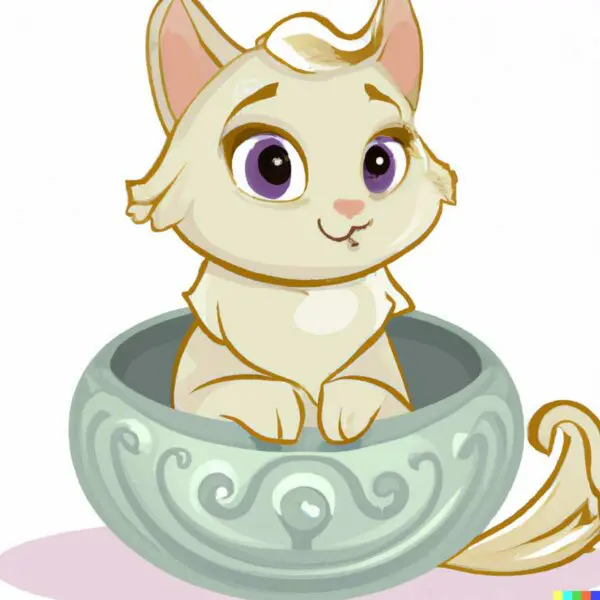
Vintage Disney Style
(little cat sitting in a bowl in vintage disney style)
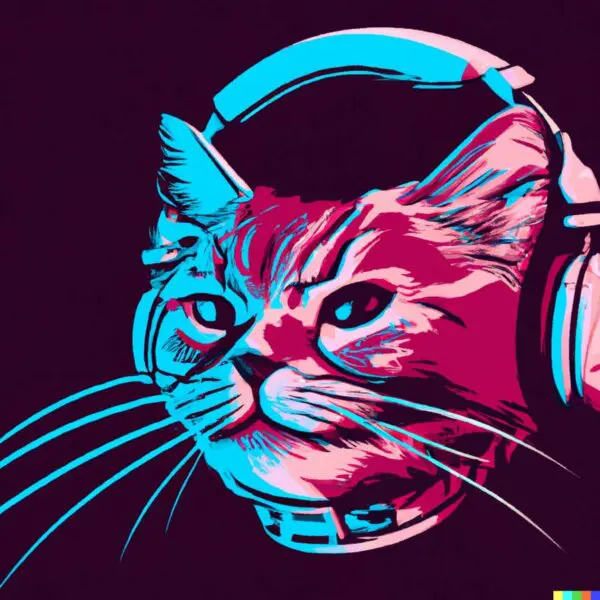
Vector Art
(a closeup of a cat face with headphones in retro
colors, synthwave style, 2d digital vector art)
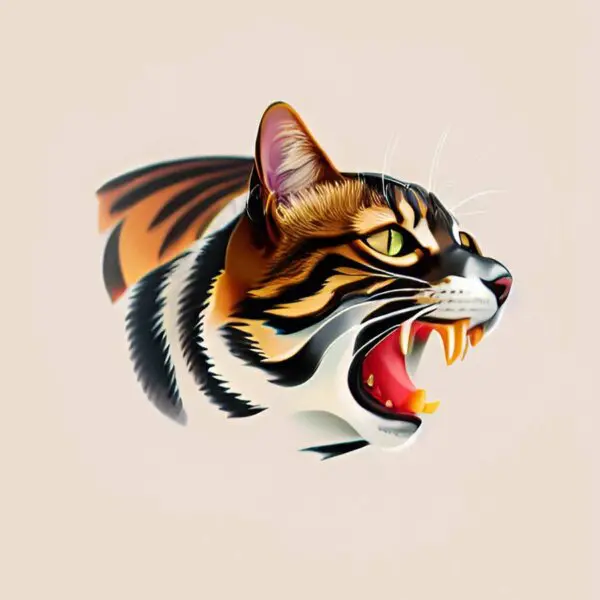
Oldschool Tattoo Style
(oldschool tattoo illustration of a cat)
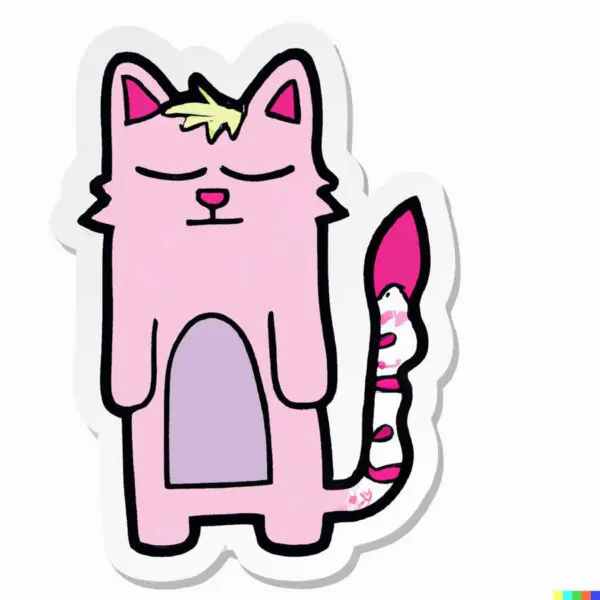
Sticker Illustration
(sticker illustration of a graffiti art cat)
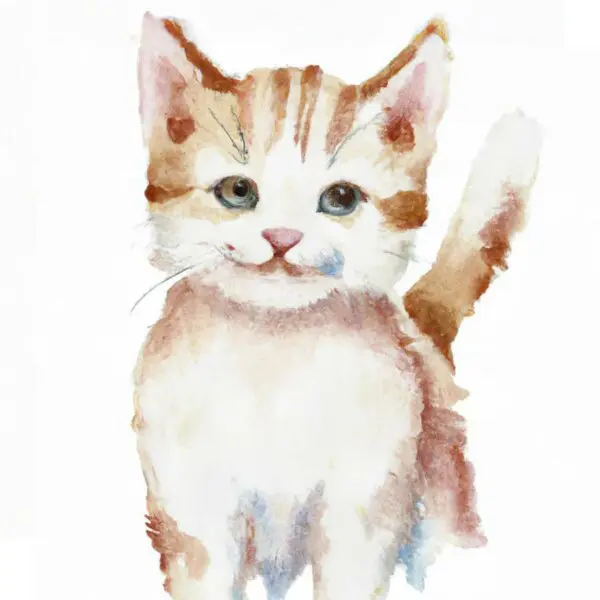
Wasserfarben-Illustration
(little cat watercolor illustration)
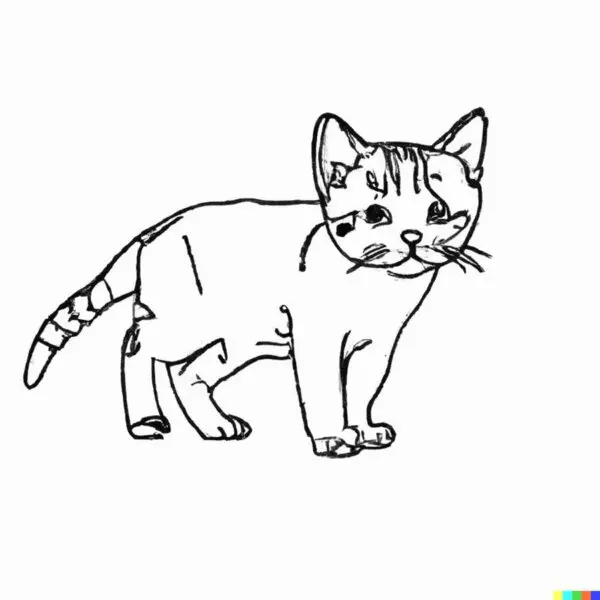
Finelinestyle
(little cat finelinestyle illustration)